Overview
Example line item (GAM link):
7078909583 (order 3817848929)
Use Case: Homepage Takeover
A homepage takeover requires all homepage ad slots to render the same advertiser creative set during the booked window. Because a single GAM creative renders only once per page, you must duplicate creatives to cover every slot.
Scope
| Objective | 100% SOV on homepage for the flight. |
|---|---|
| Inventory | All homepage ad units (see Placements & Ad Units). |
| Targeting | Key-Value category=homepage + site/domain as needed. |
| Delivery | Standard/High priority with even or ASAP pacing, capping per specs. |
Key‑Value Targeting
Use the site-side key category with value homepage for precise homepage targeting.
Key = category
Value = homepage
GAM UI → Add Targeting → Custom Targeting → category = homepage
Example screenshot:
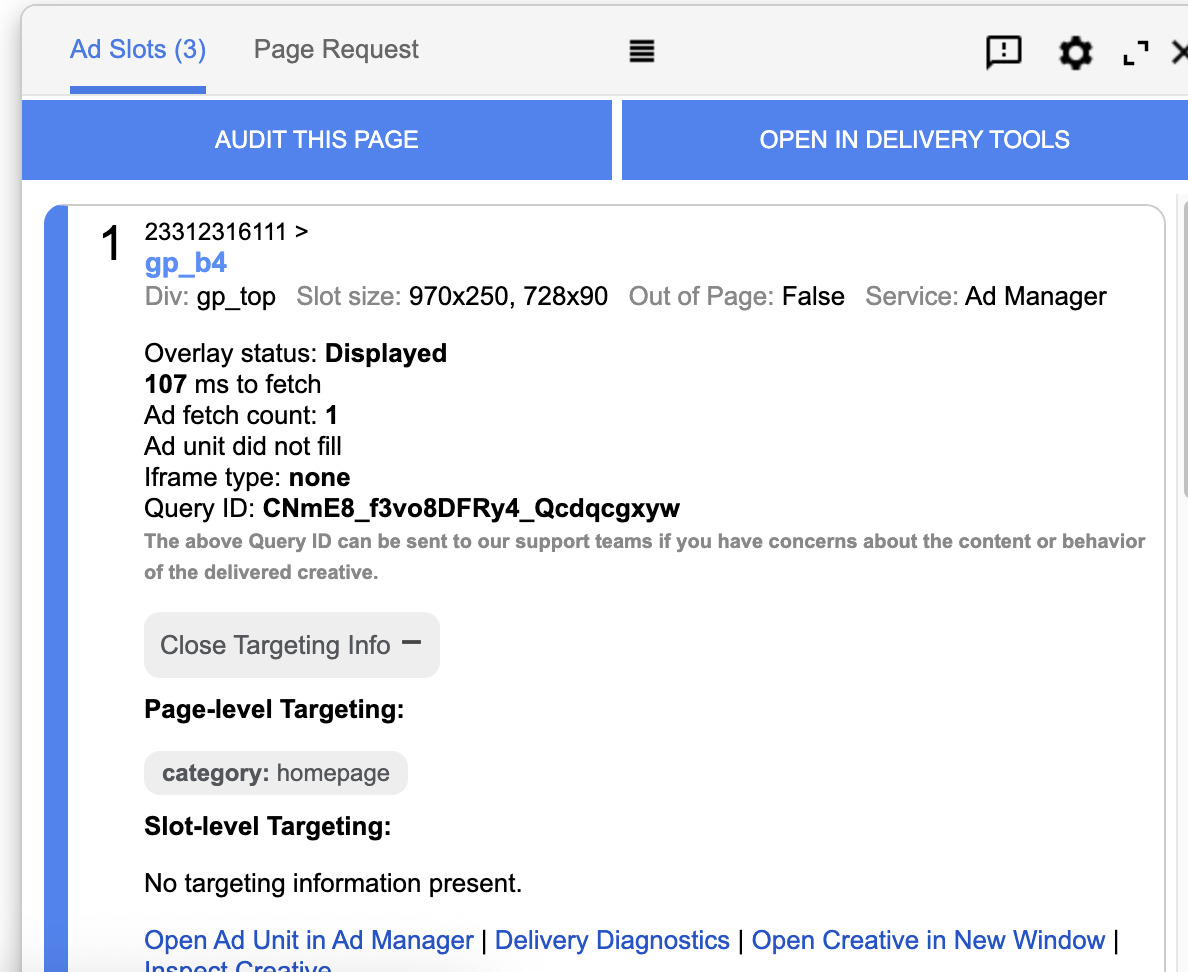
This shows the key-value targeting setup in GAM.
💡
Tip: To view the key-value targeting in the GAM console, open
The console will appear, and you will be able to see the value as shown in the screenshot above.
guernseypress.com/?google_force_console in your browser.The console will appear, and you will be able to see the value as shown in the screenshot above.
Example site-side (gpt.js) injection
<script>
  // Example: set page-level key-values
  window.googletag = window.googletag || { cmd: [] };
  googletag.cmd.push(function() {
    googletag.pubads().setTargeting('category', ['homepage']);
  });
</script>
Placements & Ad Units
Placement targeting in GAM:
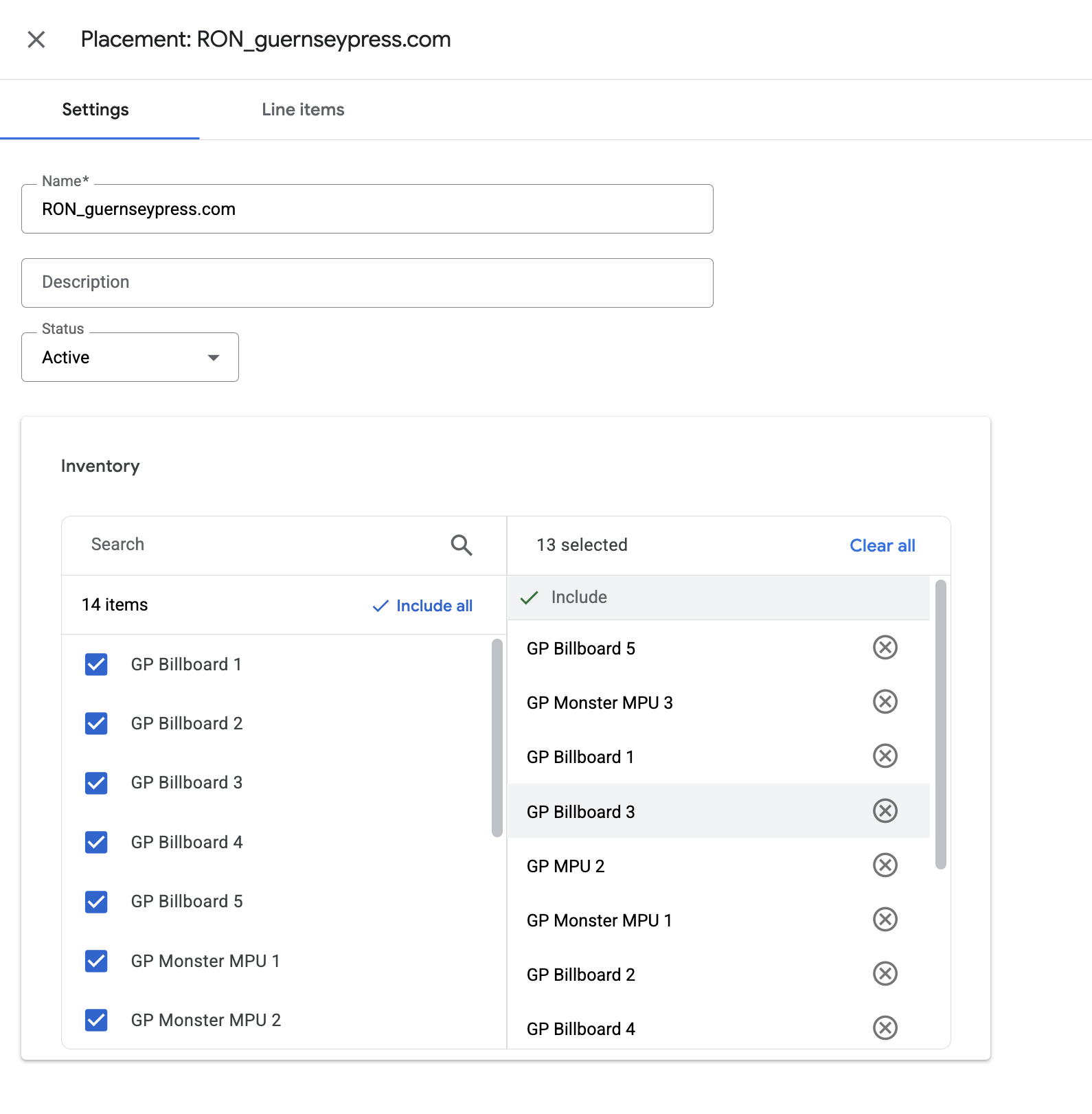
This screenshot shows how to select and maintain all ad units in the placement. Ensure all relevant ad units are included and kept up to date for consistent targeting.
Line Item Settings
| Type | Standard (or Sponsorship if 100% SOV is guaranteed) |
|---|---|
| Priority | High (e.g., 8 for Standard) / Sponsorship default |
| Pacing | Even over flight; ASAP for single-day takeovers |
| Goal | Impressions (match IO) |
| Frequency Cap | none for takeover |
| Targeting | Placement: RON_guernseypress.com + Custom KV: category=homepage + Geography/Devices as required |
| Creatives | One creative per slot (duplicate if identical). Attach all required sizes per slot. |
| Start/End | Flight dates, timezone confirmed |
| Labels | Roadblock or Competitive Exclusion as applicable |
Troubleshooting
| Symptom | Likely Cause | Fix |
|---|---|---|
| One slot shows house ad | Missing duplicate creative for that size/slot | Attach correct-size creative duplicate to line item |
| No delivery on homepage | KV not present / targeted wrong | Ensure site sets category=homepage prior to ad requests; confirm targeting on line item |
| Only some sizes render | Responsive slot missing compatible sizes | Add all supported sizes to the creative & line item |