Overview
This document covers how to implement a homepage takeover featuring a Fabric XL ad unit alongside companion banner ads.
Use Case: Homepage Takeover with Fabric XL
A homepage takeover with Fabric XL combines a high-impact Fabric XL creative with supporting banner ads across all homepage ad slots for maximum brand visibility and engagement. This takeover requires 4 creatives to cover all homepage slots.
Scope
| Objective | 100% SOV on homepage with Fabric XL + companion ads |
|---|---|
| Inventory | 4 homepage slots: 1 Fabric XL + 2 Billboards + 1 MPU |
| Targeting | Key-Value category=homepage |
| Delivery | Sponsorship or High-priority Standard |
| Duration | Typically 1-7 days |
Key‑Value Targeting
Use the site-side key category with value homepage for precise homepage targeting.
Key = category
Value = homepage
GAM UI → Add Targeting → Custom Targeting → category = homepage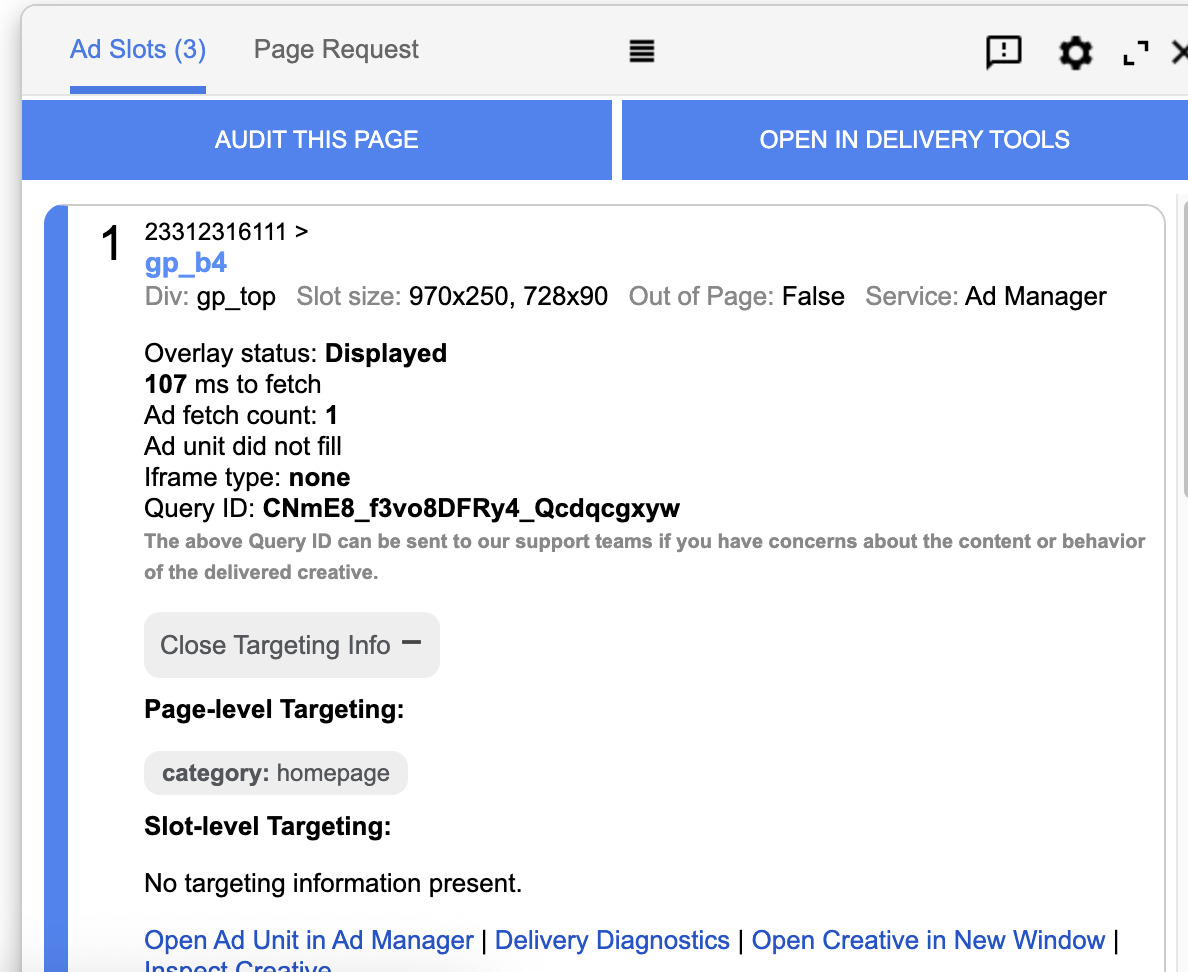
guernseypress.com/?google_force_console in your browser.The console will appear, and you will be able to see the value as shown in the screenshot above.
Example site-side (gpt.js) injection
<script>
  // Example: set page-level key-values
  window.googletag = window.googletag || { cmd: [] };
  googletag.cmd.push(function() {
    googletag.pubads().setTargeting('category', ['homepage']);
  });
</script>
Placements & Ad Units
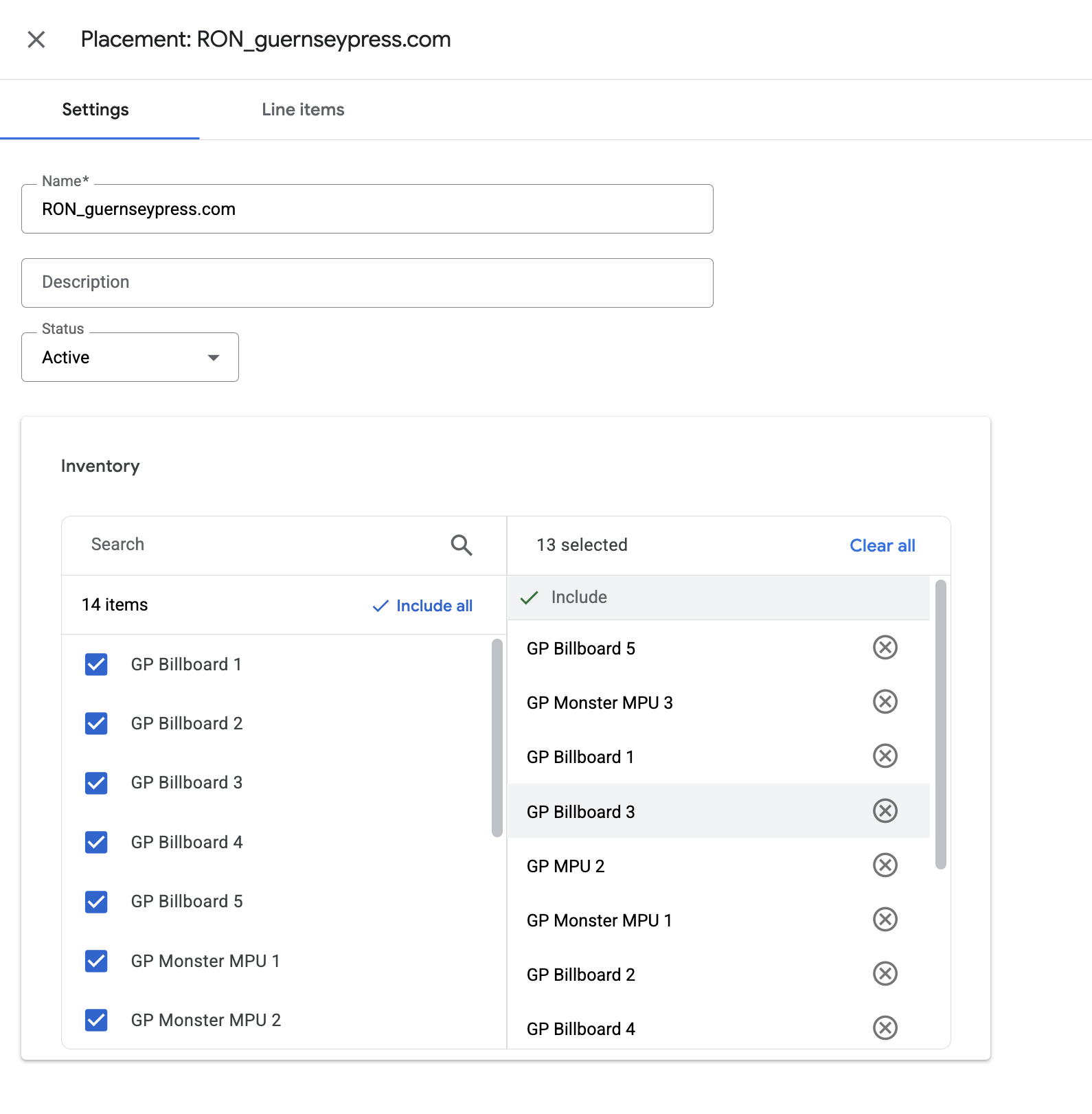
Target the homepage placement which includes:
- 1x Fabric XL ad unit (970×251 expected creative size)
- 2x Billboard slots (970×250 each)
- 1x MPU slot (300×250)
Line Item Settings
| Type | Sponsorship (recommended for guaranteed SOV) |
|---|---|
| Priority | Sponsorship default (12) |
| Pacing | Even or ASAP depending on campaign |
| Goal | Impressions (match IO) |
| Frequency Cap | 1 per user per day (recommended for Fabric XL) |
| Targeting | Placement: RON_guernseypress.com + Custom KV: category=homepage |
| Creatives | 4 total: 1x Fabric XL (970×251) + 2x Billboard (970×250) + 1x MPU (300×250) |
| Start/End | Flight dates, timezone confirmed |
| Labels | Roadblock + Competitive Exclusion |

Companion Ads
Companion ads appear alongside the Fabric XL creative to reinforce brand messaging across the homepage. For this homepage takeover, you need 4 creatives total.
Creative Requirements
| Creative Type | Size | Quantity | Notes |
|---|---|---|---|
| Fabric XL | 970 × 251 | 1 | Main high-impact ad (design at 1300×500, safe area 740×250) |
| Billboard | 970 × 250 | 2 | Two separate billboard creatives |
| MPU | 300 × 250 | 1 | Medium rectangle ad |
Creative Strategy
- Create 4 separate creatives (GAM limit: 1 creative per slot)
- Maintain consistent branding across all creatives
- Fabric XL should be the hero creative with companion ads supporting the message
- Ensure all creatives are approved before flight start
Implementation Steps
1. Create Fabric XL Creative
Follow the Fabric XL Ad Implementation guide:
- Go to Delivery → Creatives → New Creative
- Select Custom Creative Template → Fabric XL
- Upload image (design at 1300×500px, safe area 740×250px)
- Add destination URL
- Expected creative size: 970×251
2. Create Billboard Creatives (×2)
Create two separate billboard creatives:
- Size: 970×250
- Upload two distinct creatives (or duplicates if using same design)
- Add destination URLs
3. Create MPU Creative
Create the medium rectangle creative:
- Size: 300×250
- Upload creative with consistent branding
- Add destination URL
4. Configure Line Item
Set up the line item:
- Type: Sponsorship
- Add expected creative sizes: 970×251, 970×250 (×2), 300×250
- Targeting: Placement +
category=homepage - Frequency cap: 1 per user per day
5. Attach All 4 Creatives
Attach all creatives to the line item and verify approval status.
6. Test Before Launch
Use guernseypress.com/?google_force_console to verify:
- All 4 creatives are delivering correctly
- Fabric XL renders properly with safe area content visible
- Companion ads display with consistent branding
Troubleshooting
| Symptom | Likely Cause | Fix |
|---|---|---|
| Fabric XL not showing | Ad unit not on page or targeting mismatch | Verify ad unit exists and targeting matches page KV category=homepage |
| Only 3 creatives showing | Missing one expected creative size or creative not attached | Verify all 4 creatives are attached: 1×970×251 + 2×970×250 + 1×300×250 |
| Billboard showing twice with same creative | Two billboards using same creative ID | Create two separate billboard creatives (duplicate if needed) |
| House ads showing in one slot | Missing creative for that specific size | Ensure all 4 expected creative sizes are added and creatives are attached |
| Frequency cap blocking | User already saw ad today | Review frequency cap settings or test with new browser/incognito |
| Wrong targeting | KV not set or incorrect placement | Confirm category=homepage and RON_guernseypress.com placement |